
Troubleshooting
errors and their fixes.
Messages you may see, what they mean and what to do, grouped by where they appear. Tip: paste the exact error into the search box.
01First look: where to find the evidence
The commands on this page are written for the shell of macOS and Linux (bash or zsh). On Windows, run them in WSL (Windows Subsystem for Linux, Ubuntu) or Git Bash: commands such as cp, openssl, set -a && . ./.env and multi-line curl with \ do not work as written in PowerShell or cmd. The node and pnpm commands work in any of them.
Before changing anything, collect three things. Most problems name themselves in one of them.
- Ask the server how it is configured
A healthy fresh install answerscurl -s http://localhost:8787/api/health # Vercel: curl -s https://<your-domain>/api/health{"ok":true,"ai":false,"model":null,"storage":"file","admin":"on","version":"1.1.0"}."admin":"off"means the admin could not start (missingADMIN_SECRET_KEYor a database error, see the log)."ai":falsemeans AI chart reading is off or no key is usable."storage"isfileorblobfor the counters. - Read the server logThe first line of every Node start says what the server found, for example
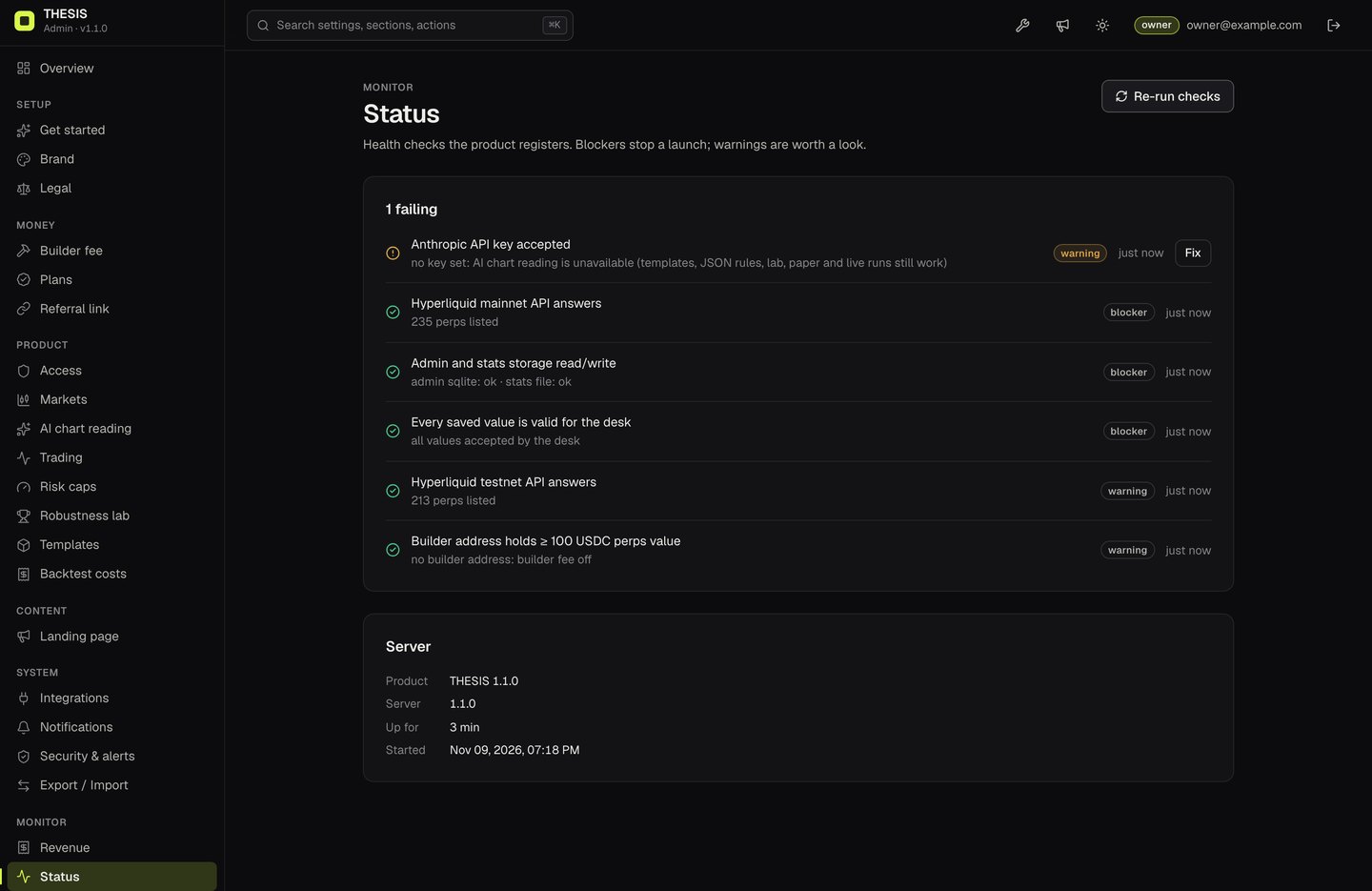
THESIS on http://localhost:8787 · AI key from the admin (Integrations), if set · admin /admin · SQLite in /srv/thesis/data, oradmin off — set ADMIN_SECRET_KEY. Where the log is: the terminal that runspnpm run server; withpnpm devthe API lines carry the prefix[api]; systemdjournalctl -u <your-service> -f; pm2pm2 logs; Dockerdocker logs <container>; Vercel: the deployment's Logs, orvercel logs <deployment-url>. - Open Admin → StatusPress Re-run checks. Each check shows the detail the server measured (an HTTP status, an account value, the failing field).
| Log prefix | Comes from |
|---|---|
[admin] | The Admin Kit: setup code, sign-ins, storage errors, secrets that cannot be decrypted, alert rules. |
[api] | An unexpected error in an /api/* route (the path follows). |
[strategy] | AI chart reading failed for a reason other than an Anthropic API error. |
[stats], [store] | The aggregate counters (file or Blob). |
[server] | The Node server itself (server/node.ts). |
In the desk, problems with trading show in the browser, not in the server log: the Run log tab (Run workspace) lists every decision, skipped entry and error; the key panel lists every host the tab contacted; the browser's developer tools (Console and Network) show blocked or failed requests.
02Install and build
"Cannot find module dist-server/server/node.js"
The server has not been built yet. Run pnpm build, then pnpm start after loading .env with set -a && . ./.env && set +a (Start the server). Build again after every update.
better-sqlite3 fails to install
It is optional. Either install a C++ toolchain (Xcode Command Line Tools on macOS, build-essential and Python on Linux) and run pnpm install again, or skip it and set DATABASE_URL to a Postgres database.
Build stops with "packages/admin-kit/ui is missing"
pnpm build copies the built console from packages/admin-kit/ui into dist/admin and stops with packages/admin-kit/ui is missing: rebuild it with `npm install && npm run build` in packages/admin-kit/ui-src when that folder has no index.html. Either restore packages/admin-kit/ui/ from the original download, or rebuild it from its source:
cd packages/admin-kit/ui-src
npm install
npm run build        # type-checks, then writes ../ui (replaces it)
cd ../../..
pnpm build
Node version error
Use Node 22.12 or newer: node --version. With nvm: nvm install 22 && nvm use 22.
Landing page blank after editing index.html
The security policy allows scripts only from files on your own host (script-src 'self', in server/csp.ts and vercel.json), so an inline <script> block added to a page is refused by the browser. Put the code in a file under public/ and load it with <script src="/your-file.js">, as public/first-paint.js does. pnpm test fails when a page has an inline script. Editing the title, meta tags or text does not affect it.
A style I added in the code does not apply
The security policy allows styles only from the stylesheet files (style-src 'self', no 'unsafe-inline'), so a style="..." attribute written into HTML or a <style> block is refused; the browser console (F12, Console) says "Refused to apply inline style". Put the rule in src/styles.css (or src/landing/landing.css) and use a class, or pass style to the h() helper in src/ui/dom.ts, which sets it through the CSSOM. pnpm test flags style attributes in the source.
03Admin
/admin answers 503, or the log says "ADMIN_SECRET_KEY is not set"
The server started without ADMIN_SECRET_KEY. The desk still runs on default settings. Set the variable and restart (Vercel: redeploy). Remember that pnpm dev and the Node server do not read .env by themselves.
I cannot find the setup code
It is printed only while no owner exists, once per start. Step by step: Setup code not found in the logs.
Admin works locally but not on Vercel
On Vercel the admin needs DATABASE_URL. Without it the function has no admin and the log says [admin] No admin storage: set DATABASE_URL (Postgres), or run server/node.ts, which keeps SQLite in THESIS_DATA_DIR. If it is set but does not connect, see Postgres.
Stored keys stopped working after a move
ADMIN_SECRET_KEY changed; the log says [admin] secret "integrations.anthropicApiKey" cannot be decrypted: was the secretKey changed? Put the old value back, or enter the Anthropic key again under Integrations (all effects and fixes).
Status: "stats file in /tmp: does not survive cold starts"
On Vercel, connect a Blob store (how).
Status: "Every saved value is valid for the desk" fails
A value passed the admin's check but not the desk's stricter schema (length, whole number, address or ticker shape). The desk uses the default for that field until you fix it; the check's detail names the field.
04Desk
"AI (off)" or "AI chart reading is off"
Either AI is switched off in the admin, or no key is set. Add the key (how) and check Status → Anthropic API key accepted.
Chart reading answers with a limit or quota message
A visitor hit the hourly limit, the desk hit its daily cap, or (with plans on) a daily quota. Raise the limits under AI chart reading or Plans.
Testnet and mainnet are disabled
For visitors from a blocked country, or because the trading switch is off. Check Admin → Access and Trading.
Live is locked
The rules have not reached the minimum robustness grade (Admin → Robustness lab). Paper runs are always available.
Connect wallet does nothing
No browser wallet is installed or it is not injecting window.ethereum in this browser.
Telegram alerts fail
The desk shows Telegram's answer in plain words: 401/404 means the bot token is wrong; "chat not found" means the chat id is wrong or you have not sent /start to the bot; 403 means the bot cannot write to that chat.
"Price feed silent for more than 2 minutes"
The Hyperliquid websocket stopped delivering. New entries are skipped while it is silent; stops and targets already sent stay on the exchange. Diagnose it with Hyperliquid API and WebSocket.
05Setup code not found in the logs
The quickest way round it: set ADMIN_SETUP_TOKEN in the environment (openssl rand -hex 24), restart or redeploy, and enter that value at /admin. With the token set the server prints no code, only [admin] No owner account yet. Open /admin and create it with the setup token from ADMIN_SETUP_TOKEN. A wrong value answers "The setup token is wrong. Use the value of ADMIN_SETUP_TOKEN from the server environment." A token shorter than 24 characters stops the server at start with a message that says so.
Without the token, while no owner exists, every start of the server (and every Vercel cold start) prints a new code. The exact lines:
[admin] No owner account yet. Open /admin and create it with this one-time setup code:

    XXXX-XXXX-XXXX-XXXX

[admin] The code is shown once, here only. Each start before the owner exists adds a new code; any printed code works until the owner is created.- Check whether an owner already exists
curl -s http://localhost:8787/admin/api/auth/setup{"needsOwner":true,"signedIn":false}means no owner yet, so a code must be in the log."needsOwner":falsemeans the owner was already created and the codes are spent: sign in instead. - Make sure the admin startedNo code is printed when the admin is off. Look for
[admin] ADMIN_SECRET_KEY is not set …or a database error line instead (Postgres), and fix that first. - Search the right log
Withjournalctl -u <your-service> --since today | grep -A3 "setup code" # systemd pm2 logs --lines 200 | grep -A3 "setup code" # pm2 docker logs <container> 2>&1 | grep -A3 "setup code" # Dockerpnpm devthe lines are in the same terminal, prefixed[api]. On Vercel, open/adminonce so a function starts, then search the deployment's Logs forsetup code. - Or simply restartA restart prints a fresh code; older printed codes stay valid until the owner exists.
Typing it: the code has 16 characters in four groups, without 0, O, 1 or I; case and dashes do not matter. A wrong code answers "The setup code is wrong. It is printed in the server log."; after 5 wrong tries in 15 minutes the form answers "Too many failed attempts. Try again later."
06Hyperliquid API and WebSocket
Symptoms: empty tickers or chart; Status → Hyperliquid mainnet API answers fails (a blocker) with an HTTP status or a timeout; the Run log shows No new closed candle from Hyperliquid yet; retrying in 10s. or long signal ignored: live price feed silent for 130s. (entries are skipped when prices have been silent for more than 2 minutes; stops and targets already sent stay on the exchange).
- Test the API from the server and from your computer
Both should start withcurl -s -X POST https://api.hyperliquid.xyz/info -H 'content-type: application/json' -d '{"type":"meta"}' | head -c 120 curl -s -X POST https://api.hyperliquid-testnet.xyz/info -H 'content-type: application/json' -d '{"type":"meta"}' | head -c 120{"universe":[{"szDecimals":(this is the request the Status check makes). A timeout or connection error points to the network, a firewall or Hyperliquid itself; HTTP 429 means rate limiting. - Rate limitsHyperliquid limits requests per IP address (the desk budgets for 1,200 request weight per minute) and the desk retries with backoff. Many users behind one office or VPN address share that budget. The Status checks on your server use very little.
- Check the security policyThe pages may only connect to the hosts in
connect-src:api.hyperliquid.xyz,api.hyperliquid-testnet.xyz,rpc.hyperliquid.xyz,rpc.hyperliquid-testnet.xyz(HTTPS and WSS) andapi.telegram.org. See what your host actually sends:
On Vercel the header comes fromcurl -sI https://<your-domain>/app | grep -i content-security-policyvercel.json; on a Node server fromserver/csp.ts. If the browser console shows a Content-Security-Policy error namingconnect-src, a host is missing: keep both files identical. A reverse proxy or CDN that adds its own policy can also block these hosts. - Check the WebSocketLive prices come over
wss://api.hyperliquid.xyz(testnet:wss://api.hyperliquid-testnet.xyz) straight from the browser. In the desk's key panel the network log lists the Hyperliquid hosts the tab reached; a corporate proxy, VPN or browser extension that blocks WebSockets shows up as a missing host or a failedwebsocketrequest in developer tools → Network. - Mainnet or testnet?The run mode picks the network. Market data in Paper mode comes from mainnet. Testnet runs need a testnet account with test USDC; a trading key approved on one network does not work on the other.
07Trading key approval and orders refused by Hyperliquid
Where to look: a red toast in the desk (Authorisation failed: …, Approval failed: …), and the Run log tab: an order Hyperliquid refuses appears as Decision skipped: <reason from Hyperliquid>, a failed flatten as Kill switch incomplete: … — check Hyperliquid directly. The text after the colon is the error returned by the wallet or by Hyperliquid, so copy it exactly.
| What you see | Likely cause | What to do |
|---|---|---|
No browser wallet found. Install MetaMask, Rabby or another EVM wallet. | No wallet injects window.ethereum in this browser. | Install or enable a browser wallet, reload. |
Authorisation failed: … | The user rejected the signature in the wallet, the wallet is on another account than expected, or Hyperliquid refused approveAgent; the reason follows the colon. | Read the message; check the account on Hyperliquid's own site for that network; fund it (testnet: test USDC); press Authorise again. |
| The Authorise step shows again after a reload | The key lives in the tab's memory, or in sessionStorage only if Keep it if I reload this tab was ticked; it is also dropped within a minute of its expiry (Admin → Trading → Agent key validity). | Authorise again. Keys are per network and per wallet address. |
Decision skipped: … | Hyperliquid refused the order or the request failed. Possible causes include insufficient margin, an expired or revoked trading key, or a builder-fee problem; the reason text says which. | Read the reason, check margin and open orders on Hyperliquid, authorise a fresh key, approve the desk fee. |
signal ignored: order value $… is under Hyperliquid's $10 minimum. | Risk per trade and account size give an order under 10 USD. | Not an error; the desk did not send it. |
Entry did not fill within the slippage limit; nothing is open. | The entry is an IOC limit at most N bps through the price and the market moved further. | Expected in fast markets. Raise Admin → Trading → Live order slippage only if you accept worse fills. |
A position not opened by this run is present — standing aside. | The account already holds a position in that market. | Close it on Hyperliquid or let it be; the run will not trade next to it. |
To check that signing works at all without risking funds: pnpm smoke:testnet sends a signed order to testnet from an unfunded throwaway key; Hyperliquid is expected to reject it because that account does not exist (Optional checks).
08Builder fee not approved, or builder address under 100 USDC
- Read the Status checkStatus → Builder address holds ≥ 100 USDC perps value shows the measured value, for example
perps account value 42.00 USDC: below Hyperliquid's 100 USDC minimum, builder orders will be rejected, orbuilder fee on, but no address. Fund the builder address's perps account on Hyperliquid, then Re-run checks. The check reads mainnet. - Check a user's approvalWhen a fee is on, the desk will not start a testnet or mainnet run until the user has approved it (To start: … approve the desk fee). You can ask Hyperliquid directly which maximum fee a user approved for your builder address, on mainnet (use the testnet host for testnet):
The answer is in tenths of a basis point (curl -s -X POST https://api.hyperliquid.xyz/info -H 'content-type: application/json' \ -d '{"type":"maxBuilderFee","user":"<user-address>","builder":"<builder-address>"}'0= not approved). It must be at least your fee in Admin → Builder fee. - After you raise the feeUsers who approved a lower maximum see the Approve the desk fee step again.
Approval sent but not visible yet — try again in a moment.means the approval was signed but Hyperliquid did not report it yet. - Testing on testnetThe fee is sent on testnet orders too, and the 100 USDC rule is Hyperliquid's; check Hyperliquid's builder documentation for the testnet requirement. The simplest test path is to leave the builder fee off while you test on testnet, and turn it on before mainnet.
09Anthropic API errors
Start in the console: Integrations → Test connection asks Anthropic about the selected model without spending tokens. Its answers:
| Test connection says | Meaning |
|---|---|
key accepted · <model> (no tokens spent) | Working. |
key rejected by Anthropic | HTTP 401 or 403: wrong, revoked or disabled key. Create a new key in your Anthropic account and paste it. |
key works, but model … is not available to it | Pick another model under AI chart reading. |
| Any other message | The network or Anthropic itself (timeout, connection error); the message is passed through. |
What the desk shows comes from POST /api/strategy; the JSON error code tells you where the problem is:
| HTTP · code | Message | Fix |
|---|---|---|
503 · ai_unavailable | AI is not configured on this server (ANTHROPIC_API_KEY is not set). | No usable key: add one, or re-enter it if the log says it cannot be decrypted. |
403 · ai_disabled | Chart reading is turned off on this desk. | Turn on AI chart reading. |
503 · provider_auth | The server's AI key was rejected. | Anthropic answered 401/403. Replace the key; if ANTHROPIC_API_KEY is set on the server it wins over the console (first log line: AI key from ANTHROPIC_API_KEY). |
429 · provider_rate_limited | The AI provider is rate-limiting this server. Try again in a minute. | Anthropic answered 429: your Anthropic account's rate or spend limits. Lower the daily cap, or raise the limits with Anthropic. |
429 · rate_limited, quota, daily_cap | Your own limits: per visitor per hour, plan quota, desk daily cap. | Raise them under AI chart reading or Plans if you accept the cost. |
502 · provider_rejected | AI request rejected: … | Anthropic answered 400; the message follows (for example an image it cannot use). |
502 · provider_error, 504 · provider_timeout | AI provider error <status> / The AI took too long. | Anthropic is overloaded or slow; try again. Check Anthropic's status page. |
curl -s -X POST http://localhost:8787/api/strategy -H 'content-type: application/json' -d '{}'
# {"error":"ai_unavailable",...} = the server has no usable key; anything else = the key reached the AI route
The server reloads the key about once a minute, so wait a minute after saving before testing. Overview → AI errors counts failed requests per day.
10Postgres: DATABASE_URL does not connect
Symptoms: /admin answers 503 with {"error":"admin_unavailable","message":"…"}, /api/health shows "admin":"off", and the desk runs on default settings. The log line is [admin] <reason>; it is printed once per new reason, and the server tries again every 30 seconds.
- Read the reasonIt is the database driver's own message. Typical ones:
password authentication failed(wrong user or password in the URL),getaddrinfo ENOTFOUND(wrong host),ECONNREFUSEDor a timeout (firewall, wrong port, database paused or deleted), an SSL or certificate error (missingsslmode=require). - Test the same URL from the same machineWith the PostgreSQL client installed:
If this fails, the problem is the URL or the network, not THESIS.psql "$DATABASE_URL" -c 'select 1' - Use the right stringOn Vercel with Neon, use the pooled connection string with
sslmode=require. Set it for the environment you deploy (Production and Preview are separate in Vercel) and redeploy after every change. Where to click (labels as of October 2026): Neon console → your project → Dashboard → Connect → switch Connection pooling on → copy the string; the pooled host name contains-pooler. Neon's guide: Neon docs → Connection pooling. - Postgres 14 or newerThe admin creates its
mk_admin_*tables on first use withCREATE OR REPLACE TRIGGER, which older versions do not have. - ConfirmStatus → Admin and stats storage read/write passes with a detail starting
admin postgres: ok.
[admin] postgres idle client error: … on its own is usually harmless: the database closed an idle connection (Neon suspends idle databases) and the pool opens a new one.
11Admin sign-in does not stick behind a reverse proxy
The console's session is a cookie named mk_admin: HttpOnly, SameSite=Strict, Path=/, valid 12 hours, and Secure when the request arrived over HTTPS. On a Node server, the server only believes the proxy's X-Forwarded-Proto and X-Forwarded-For headers when THESIS_TRUST_PROXY=1; otherwise it drops them. Without the variable the cookie has no Secure flag; with it and X-Forwarded-Proto: https, it has. With the variable, the client address is the right-most X-Forwarded-For entry, the one your proxy appends.
Symptoms: after Sign in the console returns to the sign-in screen, or API calls answer 401 Sign in required.
- Look at the cookieBrowser developer tools → Network → the
loginrequest → response headers: there must be oneset-cookie: mk_admin=…. Then check that the browser stored it for your domain (developer tools → storage / cookies). - Serve everything on one HTTPS hostThe cookie belongs to the exact host name. Proxy
/,/app,/api/and/admin/to the same Node process on the same domain, redirecthttp://tohttps://, and pick one ofwwwor the bare domain (redirect the other). A cookie markedSecureis not stored on a plain-HTTP page. - Pass the headers and set the variables
THESIS_TRUST_PROXY=1,THESIS_HOST=127.0.0.1, and a proxy that sendsX-Forwarded-ProtoandX-Forwarded-Forand passesSet-Cookieunchanged (no cookie path or domain rewriting). An nginx example:location / { proxy_pass http://127.0.0.1:8787; proxy_set_header Host $host; proxy_set_header X-Forwarded-For $proxy_add_x_forwarded_for; proxy_set_header X-Forwarded-Proto $scheme; } - Custom headerEvery change request from the console carries
x-mikodes-admin: 1. If saves answer 403Missing x-mikodes-admin header, the proxy or a security filter strips custom headers. - Links from other sitesWith
SameSite=Strictthe browser does not send the cookie when you arrive from a link on another site (an email, a chat), so that first page looks signed out. Reload, or open/admindirectly.
Without THESIS_TRUST_PROXY=1 behind a proxy, every visitor also appears to come from the proxy's address, so they all share one AI hourly limit.